JCMA Gets You to Cloud. It Doesn't Guarantee Your Assets Schema Survives the Trip
A straight comparison for enterprise teams deciding how to handle Assets specifically, not just "the migration" in general.
Let's Be Fair About What JCMA Actually Does Well
JCMA is Atlassian's own migration tool, and for good reason it's most teams' starting point. It's free, it's officially supported, and for straightforward Jira and Confluence content, it works. If your Assets/CMDB footprint is small, simple, and lightly interconnected, JCMA alone may be entirely sufficient. We're not here to tell you otherwise.
This comparison exists for a specific, narrower case: enterprise Assets schemas with deep object relationships, custom fields referenced across thousands of issues, and automation logic that depends on stable object keys. That's where the gap shows up.
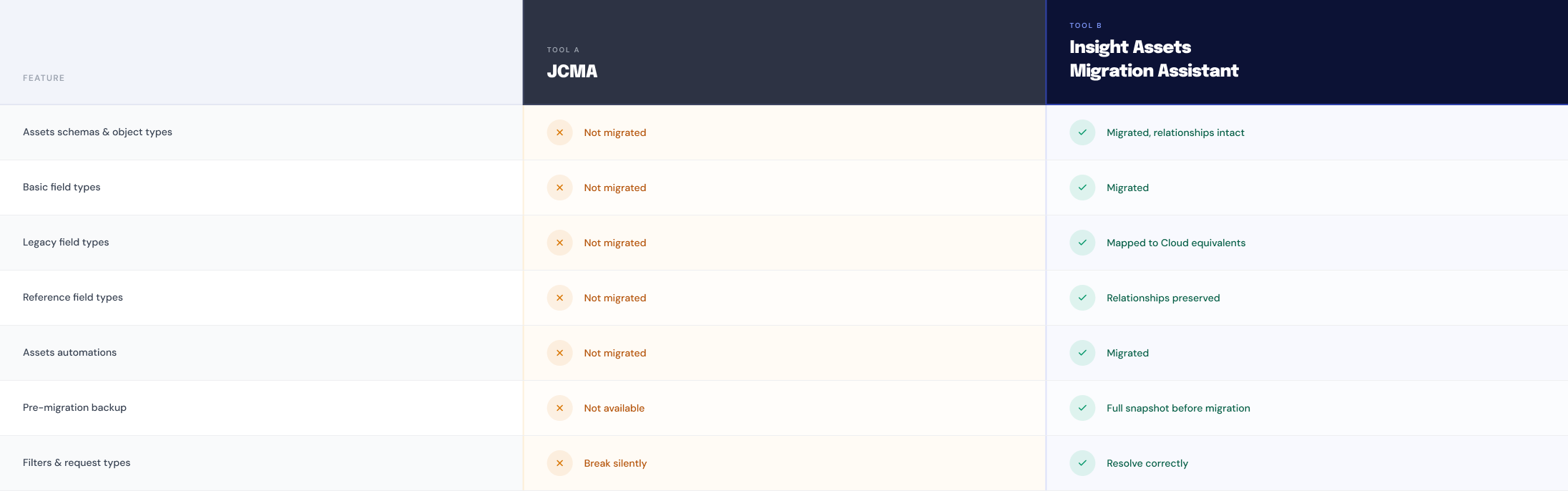
Why Object Keys Are the Real Enterprise Risk
This is the detail that matters most at enterprise scale, and it's the one most comparisons skip.
Every object in your Assets schema has a key, the actual identifier that automation rules, workflow conditions, REST API integrations, and custom field logic all point to. When a migration regenerates those keys, which is what happens by default in most general-purpose migration paths, none of that breaks loudly. Nothing throws an error. The migration report says success.
Then weeks later, an automation rule stops firing, an integration stops resolving, and someone spends a day tracing it back to a key that quietly changed during migration. At enterprise scale, with thousands of objects and dozens of dependent automations, this isn't a minor cleanup task. It's a genuine operational risk.
Insight Assets Backup & Migration is built specifically so this doesn't happen: object keys move with your data, unchanged, so everything that depended on them keeps working the moment migration finishes.
What This Means for Your Migration Plan
If your Assets footprint is simple: JCMA is probably enough on its own. No need to add a second tool for the sake of it.
If you have a large, deeply interconnected Assets schema: consider running JCMA for your general Jira and Confluence content, and Insight Assets Backup & Migration specifically for the Assets layer, where the object-key risk actually lives. These aren't mutually exclusive tools - many enterprise teams use both, each for what it's built for.
Questions ❓Worth Asking Before You Commit to a Migration Path
- What happens to object keys during this migration, specifically?
- Can I see a dry-run diff before anything moves, or is this one-shot in production?
- What's the actual rollback plan if something looks wrong after go-live?
- Does this handle custom fields and automation rules referenced across thousands of issues, or just the simple cases?